Stratify - Business Plan Google Slides
Stratify is more than a presentation template—it's a strategic storytelling tool built for clarity, professionalism, and visual impact. Designed specifically for business plans, it helps founders, consultants, and strategists articulate vision, market positioning, execution plans, and financial projections with precision. Whether you're pitching to investors, aligning internal stakeholders, or refining your roadmap, Stratify offers a clean, structured framework that keeps your message sharp and your data organized.
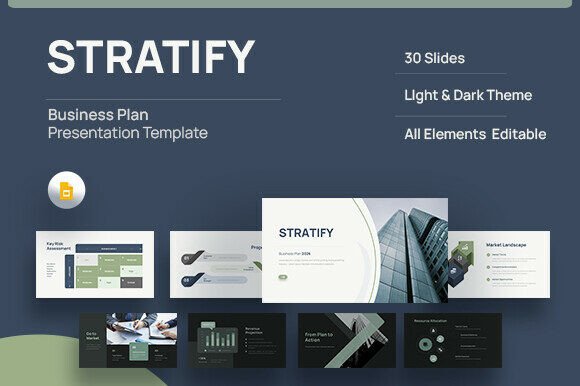
Available in both light and dark modes, Stratify adapts to different presentation environments and personal preferences without losing its executive-ready polish. Built using free web fonts, the template ensures consistent typography across devices and platforms, while remaining fully editable to match your brand's voice and visual identity. Every slide is based on master slides, making global style updates fast and intuitive. The result is a cohesive, visually balanced presentation that communicates complex business concepts with confidence and clarity.
A Structured Approach to Strategic Communication
The strength of Stratify lies in its thoughtful slide structure. With 30 total slides, it covers all essential components of a business plan—from the cover slide that sets the tone, to the foundation slides that define mission and value proposition, all the way through market analysis, strategy positioning, execution planning, financials, risk assessment, alignment, and closing summary.
Each section is designed to guide the viewer through a logical flow of information. The Market Problem Space slides, for example, help frame the opportunity and pain points your business addresses. Strategy Positioning slides allow you to clearly articulate your unique value proposition and competitive advantage. Execution Plan slides provide a visual roadmap for growth and operational milestones, while Financial Risk slides present data in a way that supports informed decision-making.
Designed for Flexibility and Professional Use
One of Stratify’s standout features is its adaptability. Whether you're a startup founder preparing for a seed round, a consultant building a client proposal, or an internal strategist aligning a corporate team, this template supports a wide range of use cases. The inclusion of picture placeholders allows for visual storytelling without being tied to specific imagery, and the editable elements ensure that the template can evolve with your brand.
Because it’s built in Google Slides and includes a .PPTX file, Stratify works seamlessly across platforms. It's especially useful for teams collaborating remotely or iterating quickly on presentation content. The documentation file included with the template walks users through setup, font installation, and customization tips, making it accessible even for those less familiar with presentation design.
Typography That Supports Strategic Messaging
Typography plays a subtle but critical role in how your message is received. Stratify uses clean, modern web fonts that prioritize readability while maintaining a professional tone. These fonts work well in both headline and body text, supporting visual hierarchy and guiding the viewer’s attention through your content.
While not a premium font in the traditional sense, the typeface used in Stratify is carefully selected to reflect a modern, business-ready aesthetic. It avoids overly stylized or decorative elements that could distract from the core message. Instead, it focuses on clarity, balance, and legibility—key traits for presentations that need to communicate complex data and strategic insights effectively.
Practical Tips for Customizing Stratify
While Stratify provides a strong foundation, customization is key to making the template your own. Here are a few practical steps to ensure your presentation aligns with your brand and messaging goals:
- Adjust the color palette to match your brand guidelines. Stratify’s neutral base makes it easy to integrate with existing brand colors.
- Replace placeholder images with visuals that reinforce your message—whether that’s product mockups, team photos, or data visualizations.
- Edit master slides to update global styles like font sizes, heading treatments, and layout spacing. This ensures consistency across your entire presentation.
- Test font pairings if you want to add visual interest. Stratify’s base font works well on its own, but pairing it with a complementary typeface can enhance branding or highlight key sections.
- Review readability on different screen sizes. Presentations are often viewed on laptops, projectors, and mobile devices—make sure your text remains legible in all contexts.
When to Use Stratify in Your Work
Stratify is particularly well-suited for strategic presentations that require clarity, structure, and visual polish. It works exceptionally well for:
- Startup pitches where a clean, data-driven format helps convey credibility and confidence.
- Consulting proposals that need to outline strategy, execution, and expected outcomes in a digestible format.
- Internal strategy sessions where teams need to align around business goals, market positioning, and execution timelines.
- Corporate planning decks that must be shared across departments or with executive leadership.
Its versatility also makes it a good fit for personal projects, such as freelance business plans or portfolio presentations that outline your professional vision and services.
Final Thoughts: A Template That Works as Hard as You Do
In a world where business plans often get buried under cluttered slides and vague messaging, Stratify stands out by offering a clean, structured, and visually engaging format. It doesn’t just help you present information—it helps you tell a compelling story backed by data, strategy, and clear execution steps.
Whether you're building a pitch deck, refining your business model, or aligning stakeholders around a shared vision, Stratify gives you the tools to do it with clarity and confidence. Its combination of modern design, thoughtful structure, and ease of customization makes it a valuable asset for anyone serious about strategic communication.