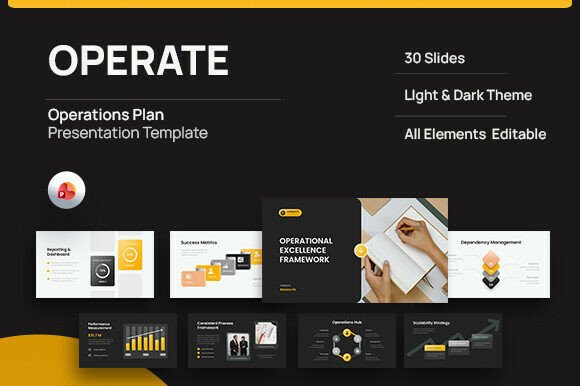
Operate - Operations Plan PowerPoint
Streamline Your Business Strategy with a Visual Framework
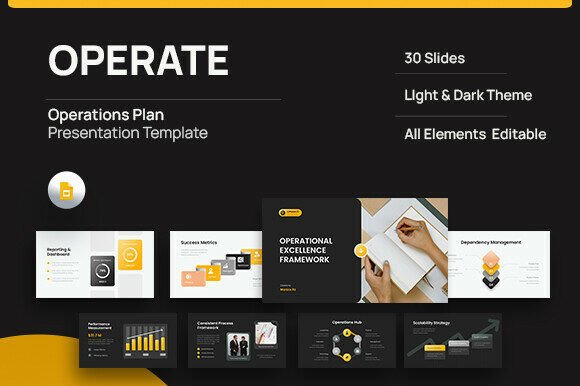
Effective business operations don't just happen—they're built with intention, structure, and clarity. The Operate - Operations Plan PowerPoint is a professional presentation template designed to help teams and leaders map out their operational strategy with precision. Whether you're a startup founder, a project manager, or a corporate strategist, this template offers a flexible and visually engaging way to communicate complex workflows, resource planning, and performance tracking.
What Makes Operate Unique?
Unlike generic slide decks, Operate is built around the core principles of operational efficiency. It provides a structured layout that supports strategic thinking across multiple dimensions of business operations. With 30 fully editable slides, users can customize each section to fit their brand, message, and specific operational needs. The template includes sections for:
- Operational Foundation
- Operating Model Structure
- Process Workflow Mapping
- Capacity and Resource Planning
- Performance Metrics and Risk Control
- Cost Scalability Analysis
- Improvement Roadmaps
Each slide is designed with a clean, modern aesthetic and is available in both light and dark modes, making it adaptable for any presentation environment. The use of free web fonts and master slide-based design ensures consistency and ease of editing, while placeholder images allow for seamless customization.
Creative Applications for Diverse Users
The flexibility of the Operate - Operations Plan PowerPoint makes it ideal for a wide range of professionals. Here's how different users can adapt the template to suit their goals:
For Startup Founders
Founders can use Operate to outline their operational strategy when pitching to investors or aligning internal teams. By clearly visualizing the organizational structure, workflow processes, and scalability plans, they can demonstrate a clear path to growth and operational maturity. For example, a SaaS startup might use the Capacity & Resources Tools section to show how their team and infrastructure will scale with user growth.
For Project Managers
Project managers can adapt Operate to create internal strategy decks that outline team roles, process workflows, and risk mitigation plans. The Performance & Risk Control slides are particularly useful for tracking KPIs and identifying potential bottlenecks before they become issues. This helps keep projects on track and teams aligned around shared goals.
For Consultants
Operate serves as a strong foundation for consultants presenting operational frameworks to clients. By customizing the slides to reflect the client’s industry or business model, consultants can offer a visually compelling and data-driven narrative. The Improvement Roadmap section can be used to outline phased implementation plans or process optimization strategies.
For Educators and Trainers
Educators can use the template to teach business operations concepts in a structured format. Whether used in a classroom or corporate training setting, Operate helps break down complex ideas into digestible visuals. For example, the Process Workflow slides can be used to walk students through supply chain logistics or customer service operations.
Customizing Operate for Different Formats and Contexts
While the template is built for PowerPoint, its modular design makes it easy to adapt for other formats. Here are a few ways to extend its use:
Turning Slides into Reports or Whitepapers
Each slide can be exported and formatted into a report layout. By adding detailed commentary and data visualizations, users can transform the presentation into a downloadable PDF or printed document. This is especially useful for sharing operational strategies with stakeholders who prefer reading over viewing presentations.
Repurposing for Web and Mobile
Slides can be adapted into web-based dashboards or mobile-friendly summaries. For instance, key performance metrics from the Performance & Risk Control section can be embedded into internal company portals or shared via digital collaboration tools like Notion or Google Workspace.
Creating Social Media Graphics
Individual slides can be cropped and styled for use as social media graphics. The clean layout and visual hierarchy of Operate make it ideal for platforms like LinkedIn or Twitter, where concise, impactful visuals perform well. For example, a slide from the Cost Scalability section can be used to illustrate how a business can grow without proportionally increasing overhead.
Designing with Clarity and Consistency
To get the most out of the Operate - Operations Plan PowerPoint, it's important to maintain clarity and consistency throughout your presentation. Here are a few tips:
- Stick to a Visual Theme: Choose a color scheme and typography that aligns with your brand identity. Operate's use of free web fonts ensures compatibility and readability across devices.
- Use Placeholder Images Strategically: Replace the sample images with visuals that reinforce your message—whether it's a flowchart, team photo, or data chart.
- Keep Text Concise: Avoid overcrowding slides with text. Use bullet points and short phrases to highlight key ideas and support spoken explanations.
- Highlight Key Metrics: In sections like Performance Tracking and Cost Scalability, use charts and graphs to make data more digestible and impactful.
Inspiration for Your Next Operational Presentation
If you're looking for creative ways to apply the Operate - Operations Plan PowerPoint, here are a few project ideas to spark your imagination:
- Startup Operational Plan: Create a deck that outlines how your company will scale operations while maintaining quality and efficiency.
- Remote Team Structure: Use the Organizational Structure slides to show how your remote team is organized, with clear roles and communication pathways.
- Process Optimization Roadmap: Outline a step-by-step plan for improving internal workflows, including timelines, milestones, and expected outcomes.
- Risk Management Presentation: Highlight potential risks and how your team plans to address them using the Performance & Risk Control slides.
Final Thoughts
The Operate - Operations Plan PowerPoint isn't just a presentation template—it's a strategic tool that helps teams think clearly, communicate effectively, and plan for the future. Its combination of structure, flexibility, and visual appeal makes it a valuable asset for anyone involved in business operations. Whether you're building a pitch, mapping a process, or aligning a team, Operate gives you the framework to do it with clarity and confidence.
If you're ready to bring more organization and visual impact to your operational planning, consider downloading the Operate template and making it your own. With a little customization and creative thinking, you can turn complex operations into a compelling, easy-to-understand presentation that drives results.